


A telehealth setup for mental health is the process of preparing your technology, physical space, and clinical information to have secure, effective virtual therapy sessions for conditions like anxiety, depression, or ADHD. The industry term for this practice is telepsychiatry, and getting it right matters more than most patients expect. HIPAA-compliant encrypted platforms protect your privacy the same way an in-person office does, but the environment around you is your responsibility. This telehealth setup guide for mental health walks you through every step, from hardware to clinical readiness, so your first session starts with confidence rather than confusion.
What equipment and technology do you need for telehealth mental health sessions?
The right device makes a real difference in how your session goes. A laptop or desktop is preferred over a smartphone because the larger screen gives your clinician a clearer view of your facial expressions and body language. That visibility matters clinically. Psychiatrists rely on non-verbal cues to assess mood, affect, and engagement, and a small phone screen cuts that information significantly.

Your internet connection is the next priority. A wired connection or strong Wi-Fi reduces the risk of dropped audio or frozen video during sensitive moments in a session. If your home Wi-Fi is unreliable, position yourself as close to the router as possible. A mobile hotspot works as a backup, but test it before your appointment, not during it.
Audio quality often matters more than video quality. A pair of headphones with a built-in microphone reduces background noise and keeps your conversation private. A standalone USB microphone is an upgrade worth considering if you plan to attend sessions regularly. The camera built into most laptops is adequate; you do not need an external webcam unless your built-in camera produces a very dark or blurry image.
| Equipment category | Recommended setup |
|---|---|
| Device | Laptop or desktop; tablet as secondary option |
| Internet | Wired Ethernet or strong Wi-Fi; hotspot as backup |
| Audio | Headphones with built-in mic or USB microphone |
| Camera | Built-in laptop camera; external webcam if image quality is poor |
| Power | Plugged in during session; charger nearby |
| Platform | HIPAA-compliant telehealth software; test link 24 hours before |
Before your first session, open the platform link and run the built-in audio and video test. Most HIPAA-compliant telehealth platforms include a pre-session check. Do this the day before, not five minutes before your appointment. If something fails, you have time to fix it.
Pro Tip: Keep your phone charged and nearby with your clinic’s direct phone number saved. If your video connection drops entirely, you can call in and continue the session by phone without losing your appointment time.
How do you prepare your physical space for online mental health therapy?
Your environment shapes the quality of your session more than any piece of technology. Privacy is the first requirement. Choose a room with a door that closes, and let others in your home know you are unavailable for the duration of your appointment. That boundary protects both your focus and your confidentiality.
Lighting is a detail most patients overlook until their first session. Sitting with a window behind you creates a silhouette that makes it hard for your clinician to read your expressions. Face a lamp or a window instead. Natural light from the front is ideal. A simple desk lamp pointed toward your face works well on cloudy days or in the evening.
Camera position affects the feel of the conversation. Place your device so the camera sits at roughly eye level, which creates a natural sense of eye contact. Propping a laptop on a few books achieves this without any additional equipment. A camera angled up from a low desk makes the interaction feel awkward and gives your clinician a poor view of your face.
A few additional steps make a real difference:
- Silence your phone notifications and close unrelated browser tabs before logging in.
- Put pets in another room if they are likely to interrupt.
- Use headphones to prevent audio from leaking into shared spaces.
- Consider a white noise machine or a fan outside the door to add a layer of sound privacy.
- If your home has no private space, a parked car, a library study room, or a scheduled quiet window when others are out are all legitimate options.
Pro Tip: Tell the people you live with that you have a medical appointment, not a work call. That framing tends to get more consistent respect for your privacy and quiet time.
What clinical and administrative steps should you complete before your first session?
Administrative preparation protects your appointment time. Complete new patient paperwork at least 24 hours before your first session. Most practices send intake forms, consent documents, and insurance verification through a secure patient portal. Finishing these in advance means your clinician can review your history before you connect, and your session time goes toward care rather than paperwork.
Prepare a brief personal summary before you log in. You do not need a formal document. A few notes on your phone covering your main concerns, current symptoms, and any medications you take is enough. Include any relevant medical history, known allergies, and the name of your primary care physician. This information helps your psychiatrist build an accurate clinical picture from the first visit.
Safety planning is a non-negotiable part of telepsychiatry. Before your appointment, confirm the following:
- Know your exact physical address during the call. Your clinician may need it in a clinical emergency.
- Have an emergency contact’s name and phone number ready to share.
- Know your local crisis resources. The 988 Suicide and Crisis Lifeline is available by call or text, and having that number ready is part of standard telepsychiatry safety planning.
- Identify the nearest emergency room or urgent care facility to your location.
Your first session will typically include an introduction, a review of consent and privacy policies, a brief technology check, and then the clinical conversation. You are not expected to have everything figured out before you arrive. Providers guide the conversation and reduce the pressure to self-diagnose or prepare extensively. Honest, open sharing is more valuable than a polished presentation of your symptoms.
Pro Tip: Write down one or two specific goals for your first session, such as “I want to understand whether medication might help my anxiety” or “I want to talk about how my sleep is affecting my mood.” A clear starting point helps both you and your clinician use the time well.
How do you troubleshoot common technical issues during telehealth appointments?
Technical problems happen. The goal is to handle them without losing your session or your composure. Log in at least 15 minutes early to catch issues before your appointment starts. That window gives you time to restart the platform, check your audio settings, or switch devices if needed.
The most common problems and their fixes:
- Video freezes or pixelates: Close other applications using bandwidth, move closer to your router, or switch from Wi-Fi to a wired connection.
- Audio cuts out: Check that your microphone is selected in the platform’s audio settings. Unplug and replug your headphones.
- You cannot hear your clinician: Check your device volume and confirm the correct audio output is selected in your system settings.
- Connection drops entirely: Switch to phone audio or call the clinic directly. Most practices have a protocol for this and will continue your session by phone.
- Platform will not load: Try a different browser. Most HIPAA-compliant telehealth platforms work best in Chrome or Firefox.
Avoid multitasking during your session. Checking your phone or email during a therapy appointment is more disruptive than it seems. Your clinician notices, and it signals to your own nervous system that the session is not a priority. Treat the appointment the way you would treat an in-person visit.
Pro Tip: If a technical failure causes frustration mid-session, say so out loud. Your clinician can help you regulate that frustration in real time, and naming it often makes it easier to set aside and return to the work of the session.
Key Takeaways
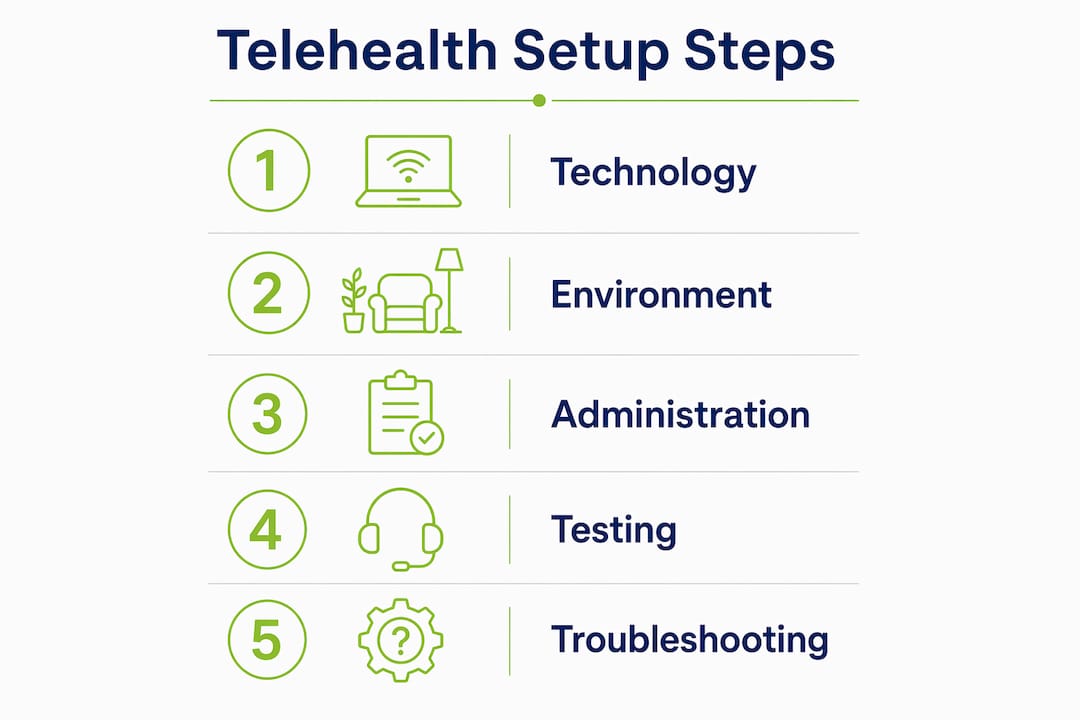
A successful telehealth mental health session depends on preparation across three areas: technology, environment, and clinical readiness, not on having a perfect setup.
| Point | Details |
|---|---|
| Device and connection first | Use a laptop or desktop with a stable wired or strong Wi-Fi connection for the clearest clinical interaction. |
| Face your light source | Position yourself facing a lamp or window so your clinician can read your facial expressions accurately. |
| Complete paperwork early | Submit intake forms and consent documents at least 24 hours before your first session. |
| Safety planning is required | Know your physical address, emergency contact, and the 988 crisis line before every telepsychiatry appointment. |
| Log in 15 minutes early | Early login gives you time to fix technical issues before they affect your appointment. |
What I have learned from watching patients adapt to telepsychiatry
We have worked with a lot of patients who came into their first telehealth session convinced the technology would get in the way. Most of them were wrong. Patients adjust quickly to the virtual format, and within a session or two, the screen stops feeling like a barrier. The conversation takes over, and that is exactly how it should be.
What I have noticed is that the patients who prepare even a little, who close their door, face a light source, and jot down one or two things they want to discuss, tend to get more out of their sessions from the start. It is not about perfection. It is about signaling to yourself that this time matters.
The therapeutic relationship drives outcomes far more than the specific technology you use. A slightly grainy video with an honest, open patient produces better clinical results than a studio-quality setup with someone who is guarded or distracted. We have seen this consistently. The tech is just the door. What happens once you walk through it is what counts.
At Nortexpsychiatry, we follow up after sessions, track medication responses, and adjust care plans based on what patients report between visits. That continuity matters as much as any single session. If you are managing anxiety, depression, or ADHD, the benefits of telepsychiatry for ongoing care are real and well-documented. You do not need to have it all figured out before you start.
— Felix
How Nortexpsychiatry supports adults starting telehealth mental health care
Nortexpsychiatry serves adults across Allen, Frisco, McKinney, Plano, and the broader North Dallas area with both in-person and telehealth psychiatric care. If you are managing anxiety, depression, ADHD, or a mood disorder, our team offers medication management, psychiatric evaluations, and ongoing support through a format that fits your schedule. Getting started does not require a perfect setup. It requires one step. Read our guide on when to seek psychiatric care to understand what to expect and whether telepsychiatry is the right fit for where you are right now. For patients already in care, our medication management resources support treatment continuity between visits.
FAQ
What does a typical online mental health session look like?
Most sessions last 45–50 minutes and follow a structure similar to in-person visits, including a check-in, clinical discussion, and next steps. Your first session will also include consent review and a brief technology check.
Do I need special software for a telehealth mental health appointment?
Most practices use HIPAA-compliant platforms that run in a standard web browser. You typically receive a secure link by email or text before your appointment, and no software download is required.
What happens if my internet connection drops during a session?
Switch to phone audio or call your clinic directly. Most practices have a backup protocol and will continue your session by phone without rescheduling.
Is telehealth therapy as effective as in-person therapy?
Teletherapy effectiveness depends primarily on the quality of the therapeutic relationship, not the delivery format. For most conditions, including anxiety and depression, virtual care produces comparable outcomes to in-person treatment.
How early should I log in before a telehealth mental health appointment?
Log in at least 15 minutes before your scheduled time. That window lets you test your audio, video, and connection before the session starts, so technical issues do not cut into your appointment.